On October 21, 2026, the PHP development team released urgent security updates addressing two critical remote code execution vulnerabilities. These flaws could allow attackers to execute code on affected servers without authentication under certain conditions. If your business website runs on PHP, this is not an update to postpone until the next maintenance window.
For companies relying on their websites to generate leads, receive customer inquiries, or support international business, keeping the server software up to date is an essential part of protecting business continuity.
Which PHP Versions Need to Be Updated?
The latest security releases fix the vulnerabilities in the following PHP branches. Check your current PHP version and upgrade to the corresponding patched release or a later compatible version.
| Current PHP branch | Required security version |
|---|---|
| PHP 8.2 | 8.2.35 or later |
| PHP 8.3 | 8.3.36 or later |
| PHP 8.4 | 8.4.27 or later |
| PHP 8.5 | 8.5.12 or later |
PHP 8.1 and earlier versions are no longer supported by the PHP project and do not receive regular upstream security releases. Some operating system vendors may provide backported security patches, but this does not replace the long-term benefits of moving to a supported PHP branch. Plan your upgrade carefully, particularly if your website depends on legacy plugins or custom application code.
Why Should You Update PHP Immediately?
The October 2026 security release addresses two critical vulnerabilities, CVE-2026-109618 and CVE-2026-109619. Both involve conditions in PHP’s internal request-handling and memory-management processes that can lead to remote code execution. The PHP security team recommends updating immediately, and the official advisory states that there are no complete workarounds for these issues.
An outdated PHP runtime can expose more than the application itself. For a B2B website, a security incident may affect quotation forms, customer communications, product information, and the availability of important landing pages. Security updates, backups, access controls, and server monitoring therefore belong in the same maintenance plan.
Updating PHP is a critical step, but it is not a guarantee of complete security. Web applications, CMS components, server configurations, and other software must also be maintained.
Update PHP More Easily with 51 Global Tech
Server maintenance should not require every business owner to become a system administrator. At 51 Global Tech, we focus on making website infrastructure easier to manage while keeping security and reliability in view.
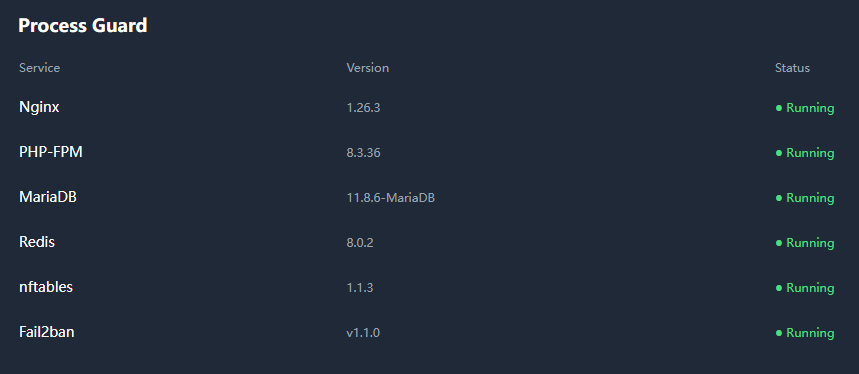
Our server management panel provides a one-click PHP version update feature, helping users upgrade their PHP environment without manually carrying out every configuration step. Before switching versions, however, it is important to check application compatibility, installed PHP extensions, and the website’s runtime configuration.
For WordPress websites and custom PHP applications, our recommended workflow is straightforward: identify the current PHP version, back up the website and database, select a compatible patched release, perform the update, and test essential functions. These checks include page rendering, administrator login, inquiry forms, scheduled tasks, and database connectivity. If a compatibility issue appears, it can be investigated before it affects normal business operations.
Our work extends beyond version updates. With experience spanning website development, server operations, deployment, and ongoing maintenance, 51 Global Tech helps businesses manage the technical foundation behind their websites. Dedicated server maintenance personnel, automated network interruption alerts, and multi-to-one dedicated support help clients address operational issues without having to manage every technical detail themselves.
Don’t Wait for a Security Incident
If your server is running PHP 8.2, 8.3, 8.4, or 8.5, verify that it meets the patched version requirements above. If you are running PHP 8.1 or earlier, plan a migration to a supported version and check compatibility before making the switch.
Need help updating PHP or maintaining your business website? Contact 51 Global Tech to discuss your server environment, PHP compatibility, and ongoing website maintenance. A timely update, followed by proper testing and monitoring, is a practical step toward a more secure and dependable website.